Import and Join Data

EE BIOL C177/C234

Chuliang Song

Today’s Menu 🎯

  1. Organize β€” RStudio Projects for tidy file structure
  2. Import β€” read_csv() + janitor::clean_names()
  3. Join β€” Combine data with left_join()
  4. Visualize β€” See the payoff of joining data!

Setup πŸ“¦

Packages for this chapter

We’ll be using tidyverse, plus three very handy packages: tidylog (for feedback on the tidyverse pipeline), janitor (for cleaning messy names), and jtools (for nice plot themes).

If you haven’t installed them, run this code:

pak::pak(c("tidylog", "janitor", "jtools", "here"))

File Organization

Use RStudio Projects!

  • Keeps scripts, data, and output organized
  • Sets the working directory automatically
  • No more setwd() nightmares!
  • File β†’ New Project β†’ New Directory

The here Package

By Jenny Bryan

Importing Data

Understanding File Paths πŸ“

When we render a .r file, the working directory is the folder containing that .r file.

my_project/
β”œβ”€β”€ my_project.Rproj
β”œβ”€β”€ data/
β”‚   β”œβ”€β”€ per-capita-co-emissions.csv
β”‚   └── temperature-anomaly.csv
└── slides/
    └── 09_import_data.r <-- We are here!

To reach data/, we must go up one level (../), then into data/:

"../data/per-capita-co-emissions.csv"

read_csv() β€” Read CSV Files

πŸ“₯ Download per-capita-co-emissions.csv

library(tidyverse)
library(tidylog)
read_csv("../data/per-capita-co-emissions.csv")
# A tibble: 94 Γ— 3
   Entity  Year `Annual COβ‚‚ emissions (per capita)`
   <chr>  <dbl>                               <dbl>
 1 World   1750                              0.0124
 2 World   1760                              0.0133
 3 World   1770                              0.0158
 4 World   1780                              0.0176
 5 World   1790                              0.0216
 6 World   1800                              0.0343
 7 World   1810                              0.0384
 8 World   1820                              0.0476
 9 World   1830                              0.0775
10 World   1840                              0.0982
# β„Ή 84 more rows

Pro tip: Use the RStudio Import Dataset button to auto-generate code!

Clean Column Names

Messy column names β†’ clean column names with one function:

read_csv("../data/per-capita-co-emissions.csv") |>
  janitor::clean_names()
# A tibble: 94 Γ— 3
   entity  year annual_co2_emissions_per_capita
   <chr>  <dbl>                           <dbl>
 1 World   1750                          0.0124
 2 World   1760                          0.0133
 3 World   1770                          0.0158
 4 World   1780                          0.0176
 5 World   1790                          0.0216
 6 World   1800                          0.0343
 7 World   1810                          0.0384
 8 World   1820                          0.0476
 9 World   1830                          0.0775
10 World   1840                          0.0982
# β„Ή 84 more rows

Annual CO2 Emissions Per Capita β†’ annual_co2_emissions_per_capita ✨

Rename for Clarity

Chain it all together β€” clean, then rename:

data_co2 <- read_csv("../data/per-capita-co-emissions.csv") |>
  janitor::clean_names() |>
  rename(
    co2 = annual_co2_emissions_per_capita
  )
data_co2
# A tibble: 94 Γ— 3
   entity  year    co2
   <chr>  <dbl>  <dbl>
 1 World   1750 0.0124
 2 World   1760 0.0133
 3 World   1770 0.0158
 4 World   1780 0.0176
 5 World   1790 0.0216
 6 World   1800 0.0343
 7 World   1810 0.0384
 8 World   1820 0.0476
 9 World   1830 0.0775
10 World   1840 0.0982
# β„Ή 84 more rows

Always Visualize After Import!

Sense-check: does the data look right?

data_co2 |>
  ggplot(aes(x = year, y = co2)) +
  geom_line() +
  labs(
    x = "Year",
    y = "Annual CO2 emissions per capita"
  ) +
  jtools::theme_nice()
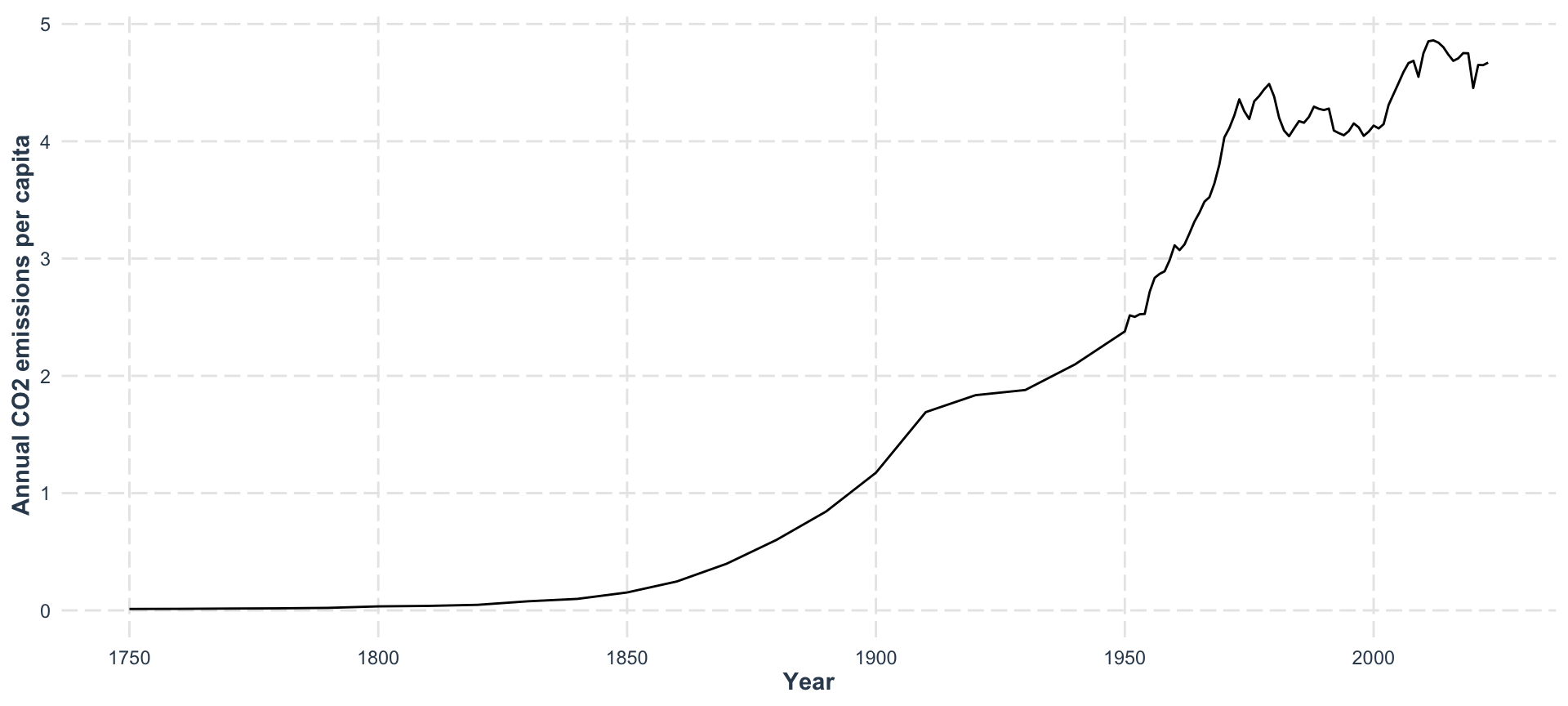
COβ‚‚ is rising β€” but how does it relate to temperature? πŸ€”

Joining Data

Why Join?

Real data lives in multiple files

  • COβ‚‚ emissions data β†’ one file
  • Temperature data β†’ another file
  • Need to combine by a shared key (e.g., year)

Import the Second Dataset

πŸ“₯ Download temperature-anomaly.csv

data_temp <- read_csv("../data/temperature-anomaly.csv") |>
  janitor::clean_names() |>
  select(year, global_average_temperature_anomaly_relative_to_1961_1990) |>
  rename(temp_anomaly = global_average_temperature_anomaly_relative_to_1961_1990)
data_temp
# A tibble: 175 Γ— 2
    year temp_anomaly
   <dbl>        <dbl>
 1  1850       -0.418
 2  1851       -0.233
 3  1852       -0.229
 4  1853       -0.270
 5  1854       -0.292
 6  1855       -0.297
 7  1856       -0.320
 8  1857       -0.467
 9  1858       -0.389
10  1859       -0.281
# β„Ή 165 more rows

Now we have two tibbles: data_co2 and data_temp

left_join() β€” The Workhorse

data_co2 |>
  left_join(
    data_temp,
    by = "year"
  )
# A tibble: 94 Γ— 4
   entity  year    co2 temp_anomaly
   <chr>  <dbl>  <dbl>        <dbl>
 1 World   1750 0.0124           NA
 2 World   1760 0.0133           NA
 3 World   1770 0.0158           NA
 4 World   1780 0.0176           NA
 5 World   1790 0.0216           NA
 6 World   1800 0.0343           NA
 7 World   1810 0.0384           NA
 8 World   1820 0.0476           NA
 9 World   1830 0.0775           NA
10 World   1840 0.0982           NA
# β„Ή 84 more rows

Keeps all rows from the left, matches from the right

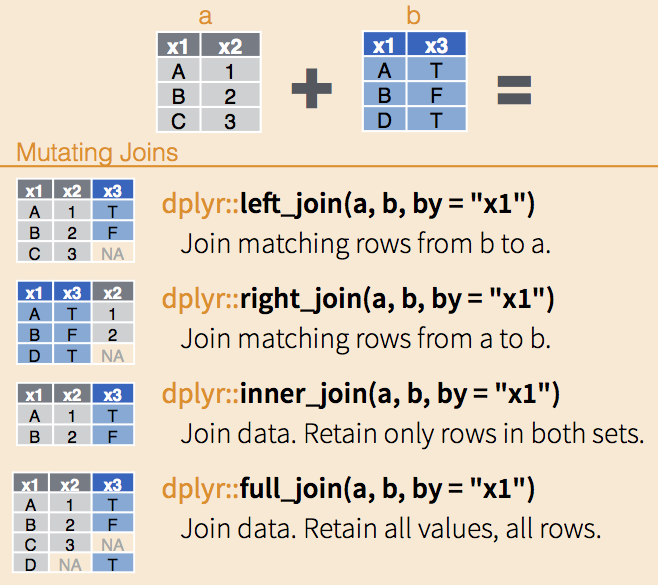
Join Types

From https://mikoontz.github.io/data-carpentry-week/lesson_joins.html

Join Types β€” Quick Reference

Join Keeps
left_join() All rows from left
right_join() All rows from right
inner_join() Only matching rows
full_join() All rows from both

Best practice: Stick to left_join() for consistency

⚠️ Join Order Matters!

Joins are asymmetric β€” flipping changes the result!

COβ‚‚ first (262 rows):

data_co2 |>
  left_join(data_temp, by = "year")

Temp first (174 rows):

data_temp |>
  left_join(data_co2, by = "year")

The left side is your primary dataset β€” all its rows are always kept!

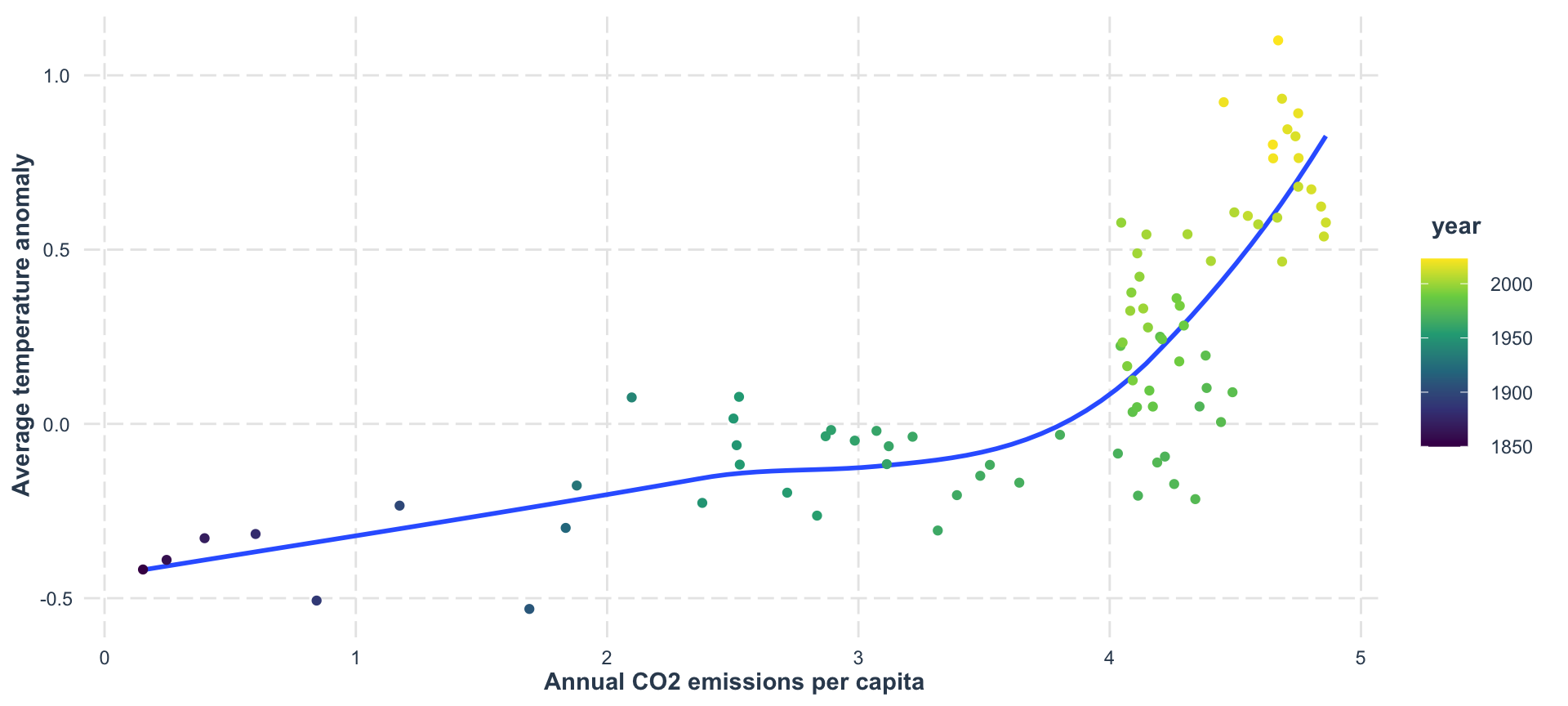
The Payoff: COβ‚‚ vs Temperature 🌑️

data_co2 |>
  left_join(
    data_temp,
    by = "year"
  ) |>
  drop_na() |>
  ggplot(aes(x = co2, y = temp_anomaly)) +
  geom_smooth(se = FALSE) +
  geom_point(aes(color = year)) +
  scale_color_viridis_c() +
  labs(
    x = "Annual CO2 emissions per capita",
    y = "Average temperature anomaly"
  ) +
  jtools::theme_nice()

This is why we learn to join data β€” to answer real questions!

Summary

  • Use RStudio Projects for organization
  • read_csv() + janitor::clean_names() for clean imports
  • Always visualize your data after importing!
  • left_join() combines data by shared keys
  • Join order matters β€” the left side is primary
  • The real power: joining lets you answer new questions